Breakdown 4 of 4
Producing a team of 15
I produced a 15-person team for 18 weeks, and automated a progress log that rendered every room in the house once a day.
Overview
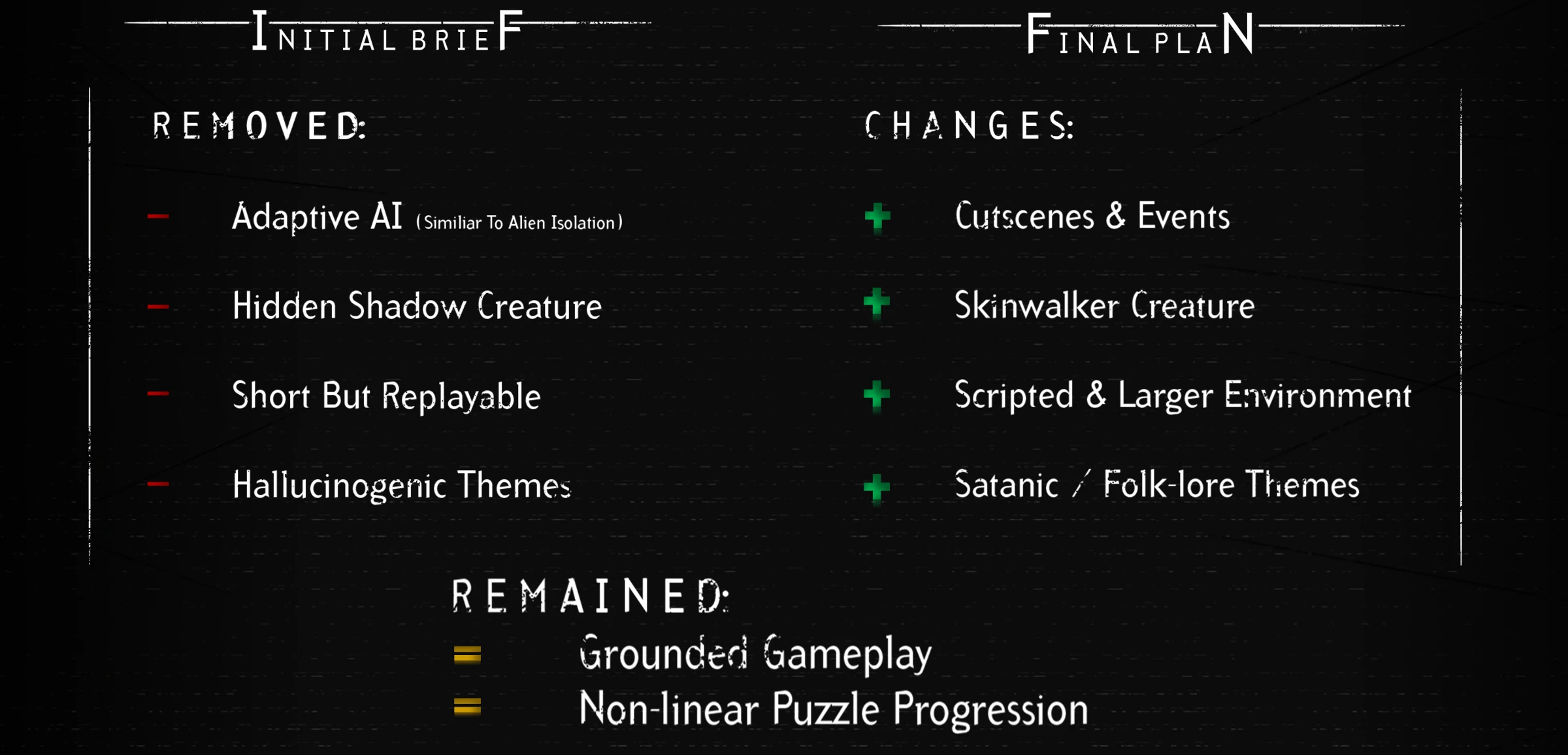
The team elected me Producer in Week 1, since the original pitch was mine and I’d done the role before on Borderline Racing. I spent that first week finding out what everyone had pictured and working the pitch into something the whole team was happy to make, not just me.
Borderline Racing had eleven people and Project UMBRAE had fifteen, and I didn’t expect how much bigger that would feel. Every task needed a web of communication around it, so coordination slowed down much faster than the headcount grew, a well-known problem in growing teams (Moken Digital, 2026).
The weekly cadence
Every week followed the same pattern:
- Monday - the sprint. We summarised the previous week’s tasks and feedback, set team-wide and individual priorities, and planned the week for everyone.
- Daily stand-ups - whatever people were stuck on, and where tasks were at.
- Thursday - playtesting.
- Friday - tutor or industry feedback, gathered for the week after, and a packaged build.
Scrum organises work into sprints with regular reviews of progress and priorities (Schwaber and Sutherland, 2020), and Godoy and Barbosa recommend frequent review points like these for game development in particular (Godoy and Barbosa, 2010). Ending every week with a showcase, or at least a playtest, also kept steady pressure on us to always have a playable build.
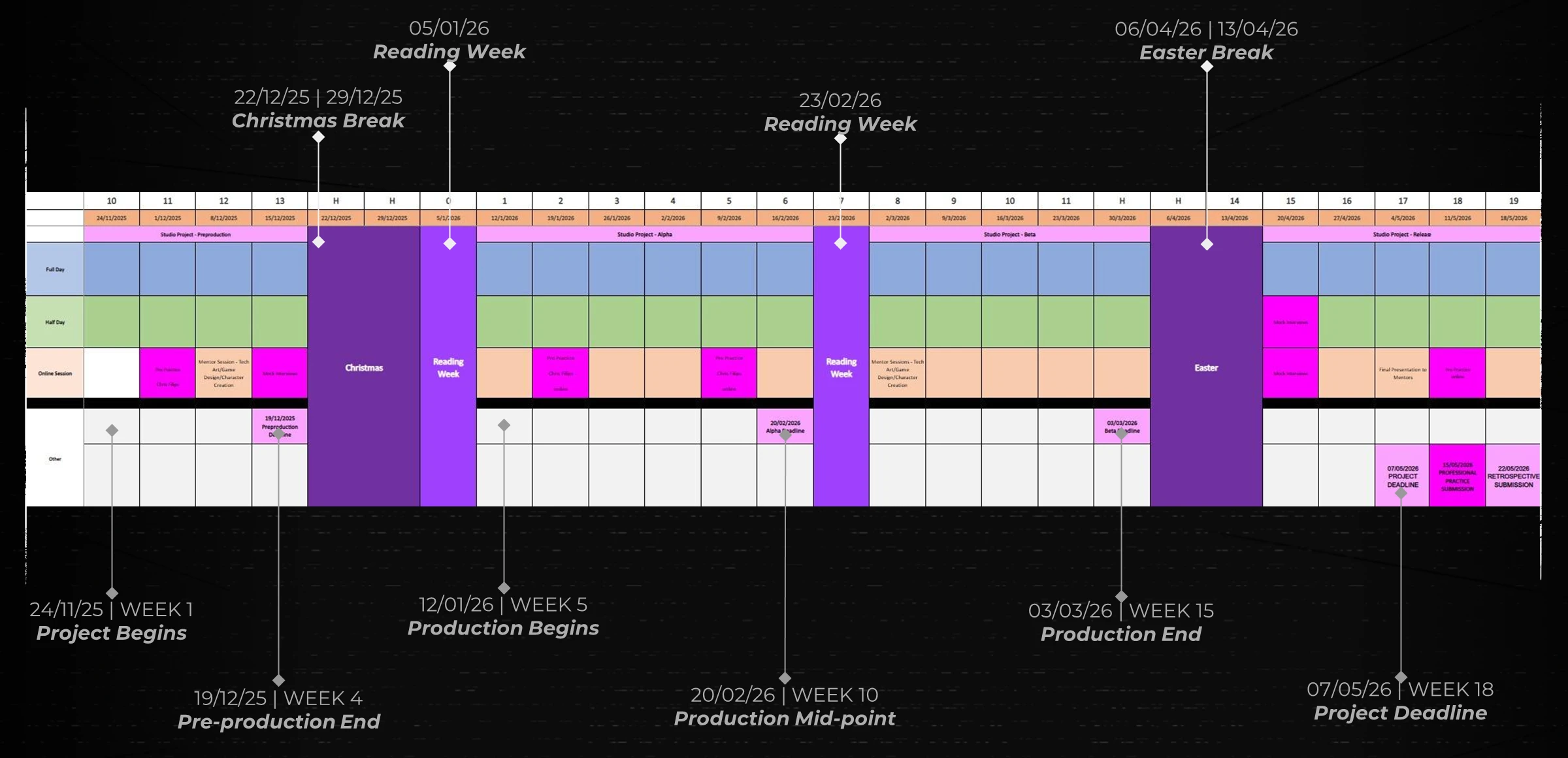
One thing I carried straight over from Borderline Racing was buffer time in the schedule (Mladenovic, 2024). It held up again, absorbing the time we lost to pivots and to things outside our control.
In the busiest weeks, though, I kept the meetings going but let the YouTrack cards fall behind.
Toolchain and documents
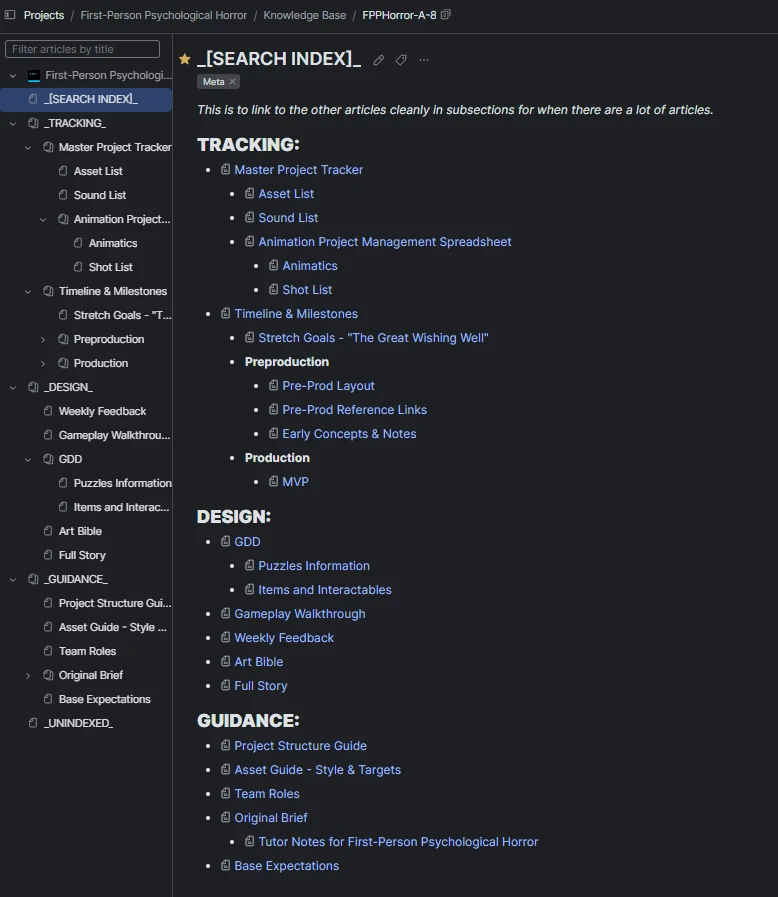
YouTrack replaced the Trello board I’d used on Borderline Racing, holding both the sprints and the knowledge base. Its Agile cards made it much clearer who owned each task, and the knowledge base kept every document in one place instead of spread across people’s drives. Once production started, I reorganised it so every page sits under Tracking, Design or Guidance.
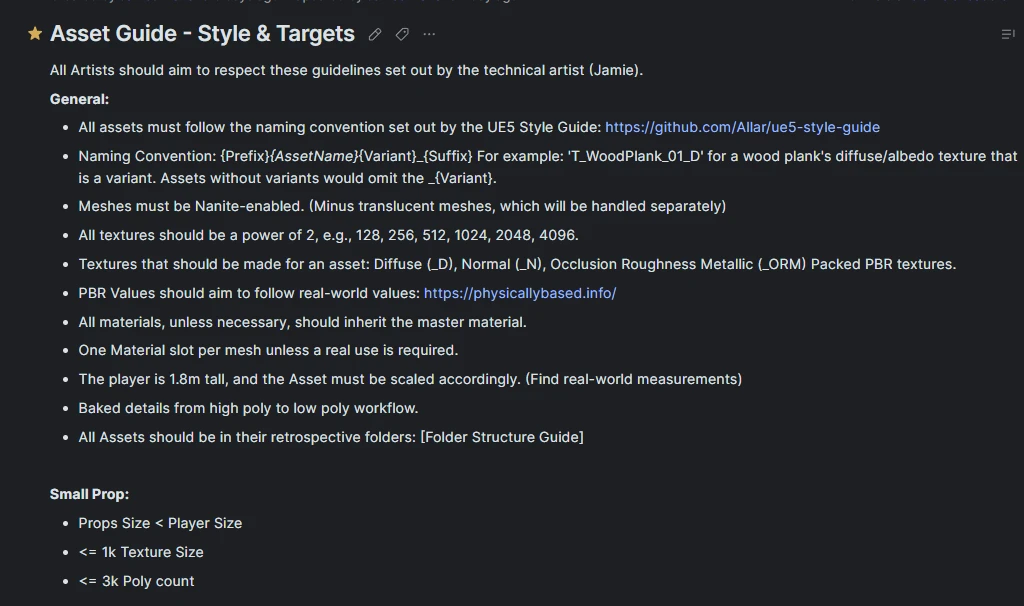
I wrote the guidance pages at the start: a project structure guide explaining how Perforce and the content browser were set up, and an asset guide with the standards every artist should hit. I also set up the Unreal project itself and got most of the team set up on Perforce.
When production started I wrote a stretch goals document too, keeping the features we’d only get to if things went well out of the main plan. We also went through the whole game together from start to finish, while I wrote every branch and puzzle into a gameplay walkthrough. Everyone knew their own area, but we’d never sat down and done that as a team, and it showed us a lot of the puzzles still needed working out.
The asset list
At the start of production I restructured the asset list around one asset, one person, so every row has exactly one owner. I’d seen people step on each other’s work on past projects, and this helped prevent it. The list has a page per room, mirroring the project folders, and anything used in more than one room moved to a generic page.
I made the sound list too. Since I was going to implement the audio, I wanted a say in it. I listed every sound I thought we’d need, like footsteps for each floor type, creature noises and the voicemail, and sent it to Jamie, our external sound designer.
The progress log
On Borderline Racing the development log was manual screenshots. I was the only one taking them, and whenever I got busy, I forgot. You can’t go back and capture early progress after the fact, so this time I wanted it automated.
Over the Christmas holiday I placed 30 cameras covering every room, an overview of each floor and the outside of the house. They live in their own sublevel and are driven by a Movie Render Queue that renders each camera for a single frame, with a burn-in that stamps every image with its location, date and version.
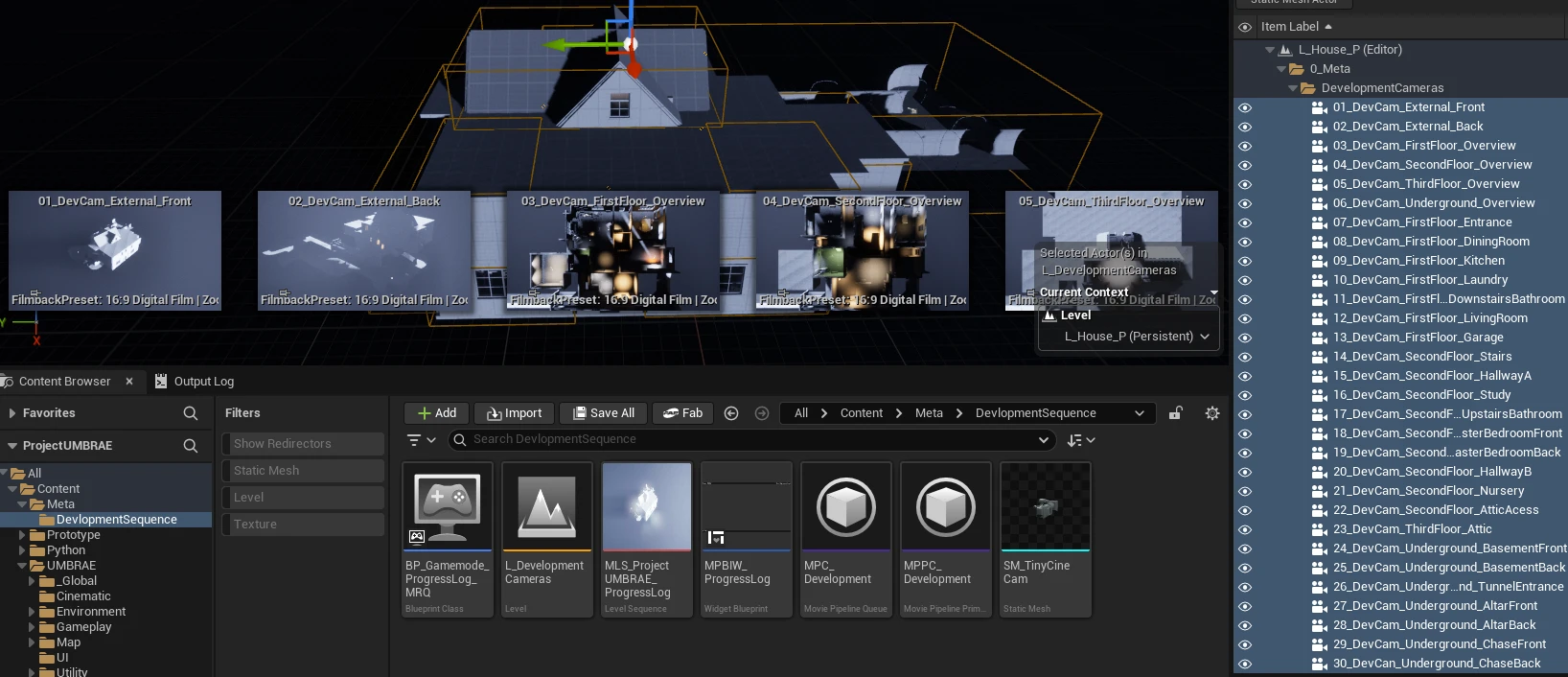
A Python startup script runs the queue (Epic Games, n.d.) (Lei, 2025). It’s
built on a shared utils library for logging, state and asset loading that other
scripts could reuse, and it only runs on my machine, once a day, waiting for the level
to load before it renders:
The startup script (Python, 75 lines)
# Libs
import os
import datetime
import time
import unreal
import utils
log = utils.Log("Progress Log")

# Config
STATE_FILE = "ProgressLog"
USER = "MarlandROG"
QUEUE_ASSET = "Meta/DevelopmentSequence/MPC_Development"
pending_version = 0

def run_mrq():
    # Load State
    state = utils.load_state(log, STATE_FILE)
    last_run = state.get("last_run", "")
    version = int(state.get("version", 0))

    # Check if its correct user
    if USER != os.getlogin():
        log.info("Not correct User. Aborted.")
        return

    # Check if its a new day
    if last_run == str(datetime.date.today()):
        log.info("Already ran today. Skipping.")
        return

    # Create MRQ
    version += 1
    log.info(f"New day, preparing MRQ. (Version {version})")
    mrq_subsystem = unreal.get_editor_subsystem(unreal.MoviePipelineQueueSubsystem)
    queue = mrq_subsystem.get_queue()
    queue.copy_from(utils.load_asset(log, QUEUE_ASSET))

    # Wait for level to be loaded
    loaded = False
    TRIES = 20
    for i in range(TRIES):
        if unreal.get_editor_subsystem(unreal.UnrealEditorSubsystem).get_editor_world():
            log.info("MRQ level is loaded. Executing.")
            loaded = True
            break
        log.warning(f"MRQ is waiting on the level to be loaded! Tried {i}/{TRIES} times.")
        time.sleep(1)

    if not loaded:
        log.error("Level failed to load in time!")
        return

    # Execute MRQ
    executor = unreal.MoviePipelinePIEExecutor()
    try:
        executor.on_executor_finished_delegate.add_callable(on_mrq_finished)
        mrq_subsystem.render_queue_with_executor_instance(executor)
        log.info("MRQ now running.")
    except Exception as e:
        log.error(e)
        return

    # Remember the version until the render finishes
    global pending_version
    pending_version = version

def on_mrq_finished(executor, success):
    if success:
        log.info("MRQ completed successfully!")

        # Save new state only once the render has worked
        state = {"last_run": str(datetime.date.today()), "version": pending_version}
        utils.save_state(log, STATE_FILE, state)
    else:
        log.error("MRQ failed or was canceled by the user.")
After that it ran itself, and each camera built up a daily record of its room. Checking what a room looked like weeks ago took seconds, and there were enough images to make time-lapses.
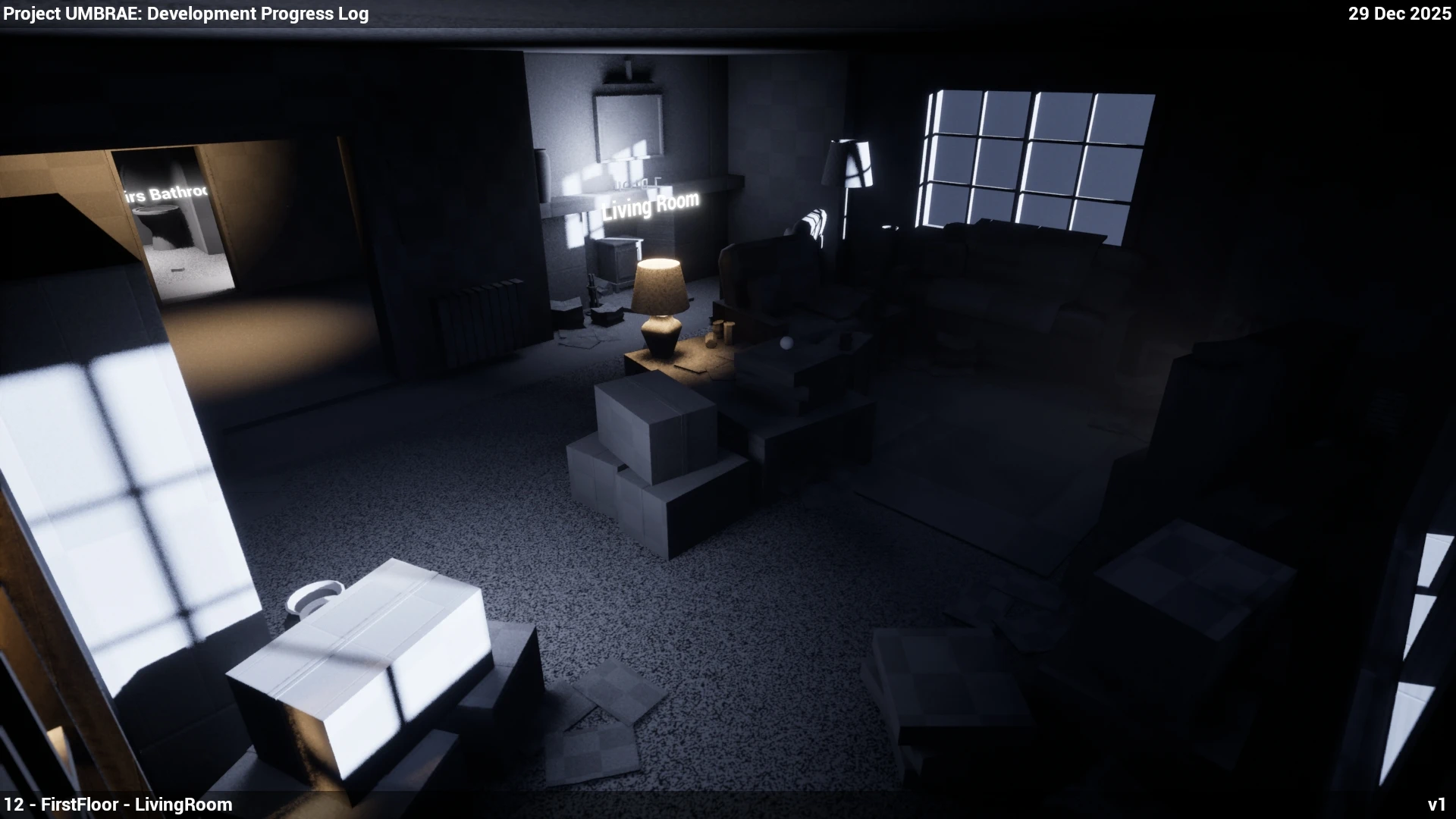
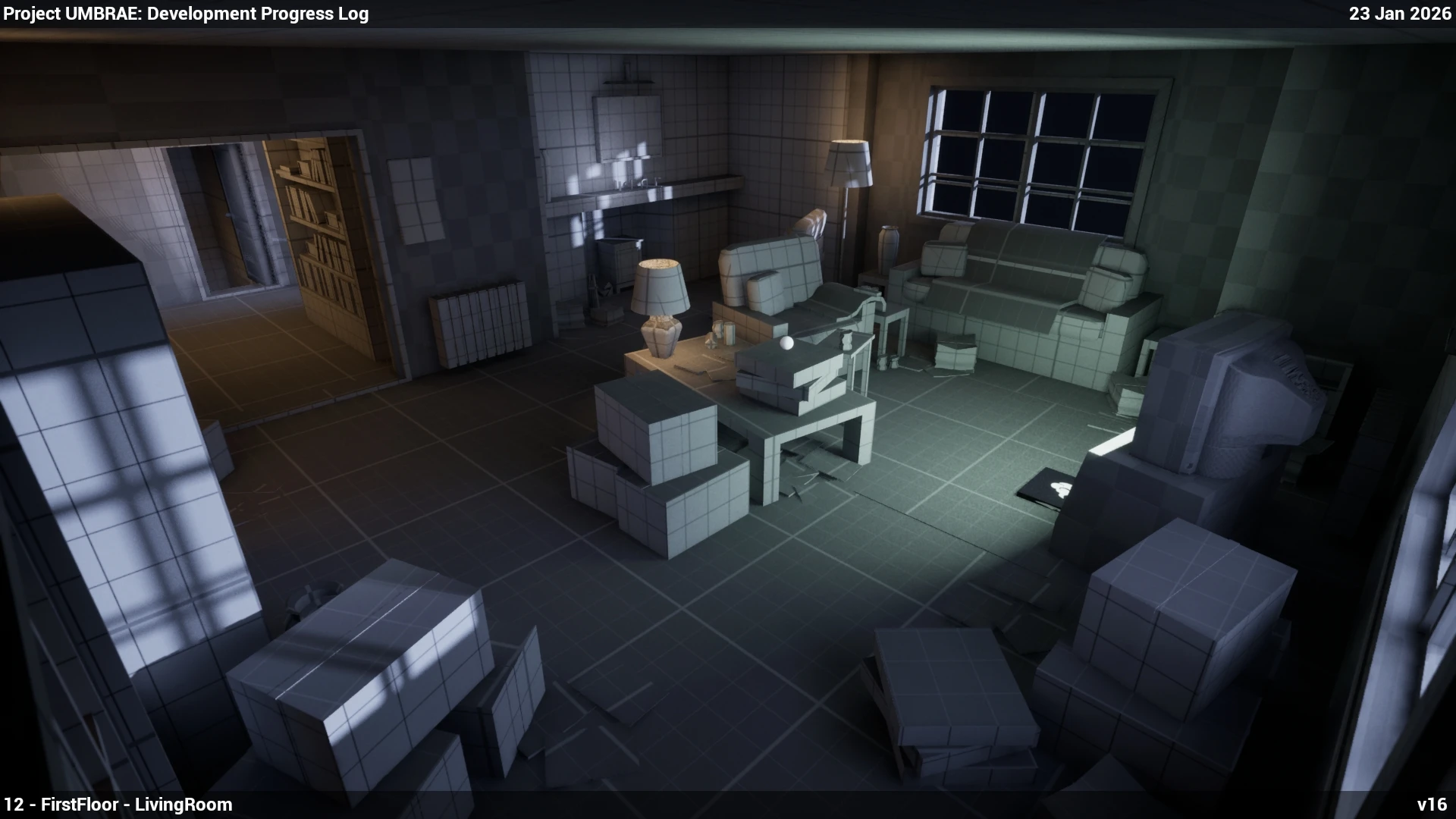
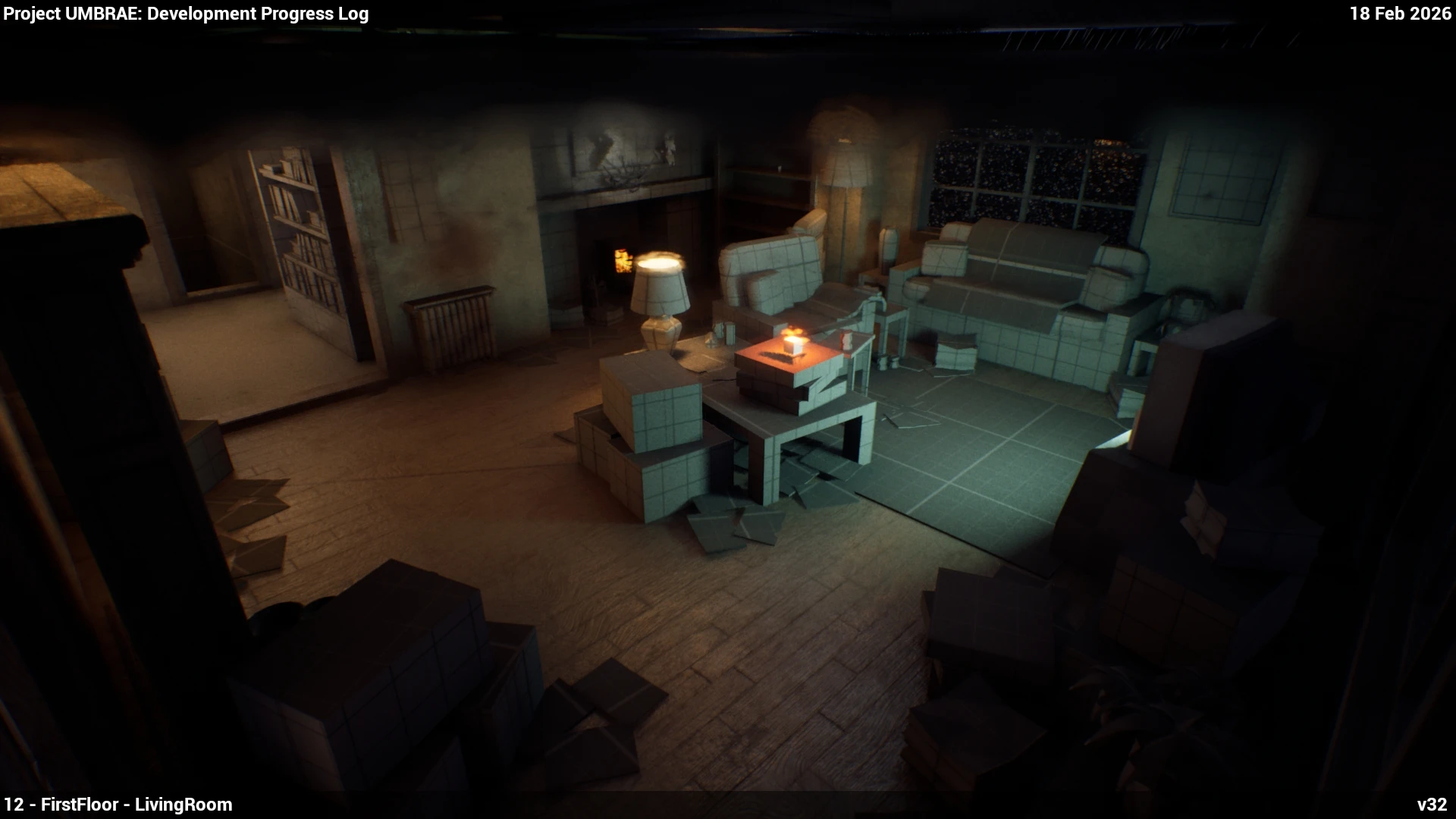
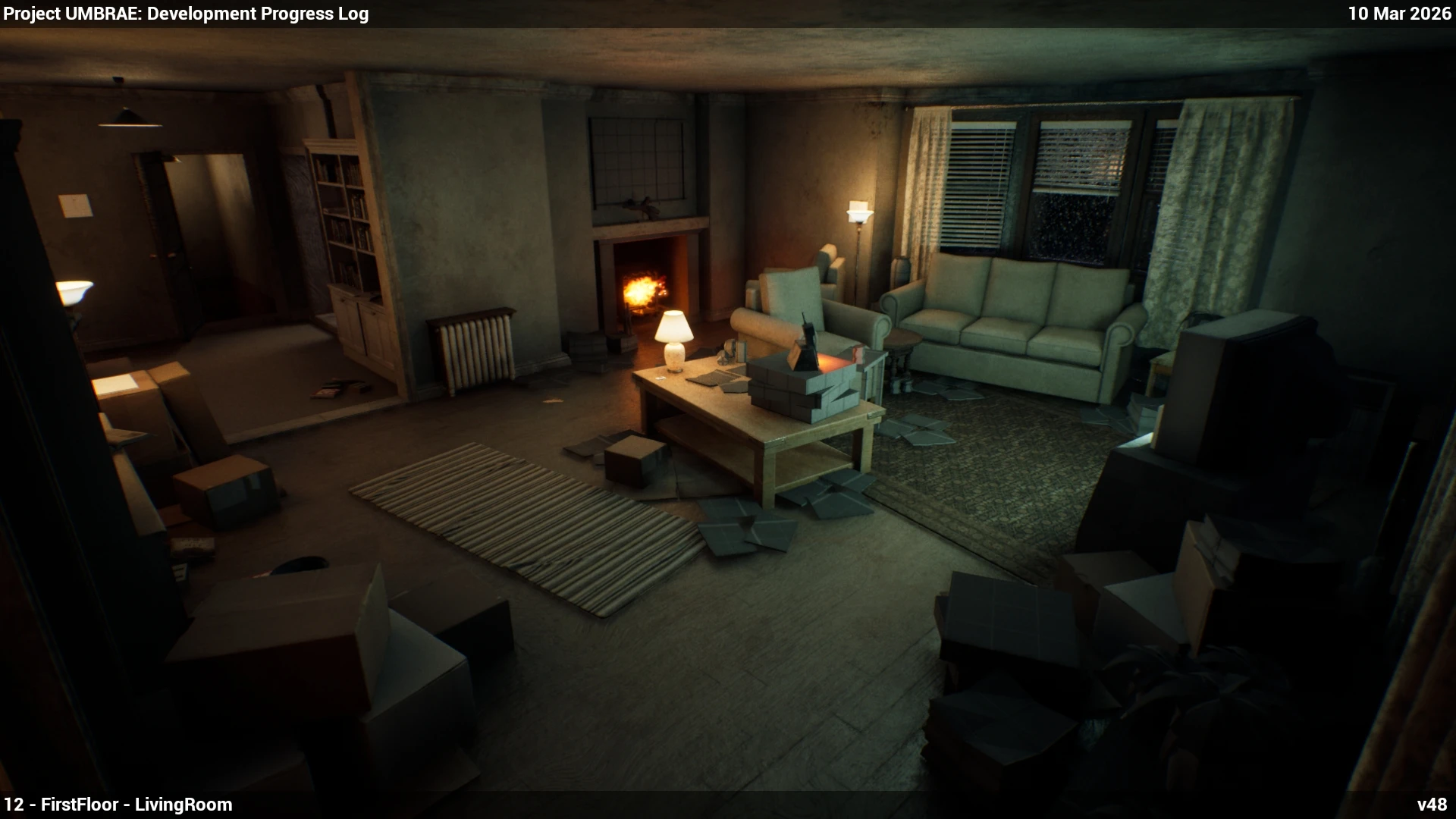 29 Dec23 Jan18 Feb10 Mar
Video guides
A lot of the team needed help with the same things, so I recorded a set of video guides, from setting up Perforce and Unreal to the full asset pipeline. Before recording each one, I’d already walked a few people through it in person, and that told me what needed explaining.
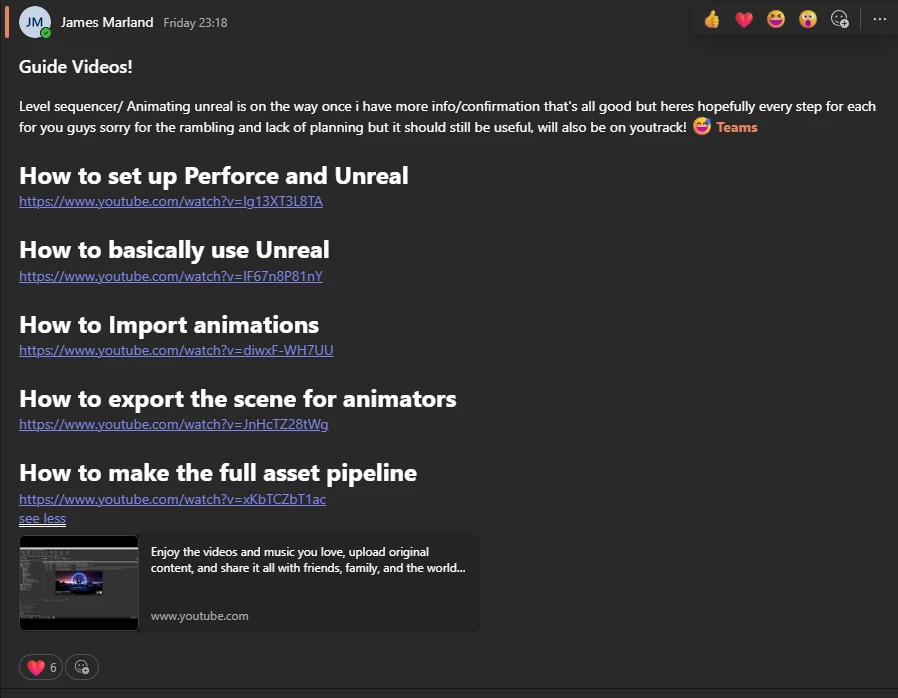
Lauren had never used Unreal and didn’t have it set up, but she followed the animation guide and got her creature animations into the project without me sitting with her.
Playtesting and feedback
Lauren wrote our playtest feedback form, and Kanye was in charge of collecting the responses. Even the first playtest showed that exploring the house, one of our core pillars, felt natural. Players struggled with the small puzzles because of head bob and scale, so those ended up locked to a fixed camera.
As we went from no scares to a placeholder and then the creature, players kept finding the game scarier before anything appeared. We made the creature’s animation and look scarier, but what worked best was fog, which cut down how far players could see ahead and in their peripheral vision. Combined with sound, it got the game back to feeling like psychological horror.
Both of Karl’s industry showcases went well. The one concrete problem he found at the second was a softlock in the inspection system.
The pivot
The biggest team-wide decision came in Week 9. Amy was building our two characters from scratch, and as a team we realised that two original, handmade characters were more than we could finish by the deadline. After talking it through with the people it would affect, I met Michael about animating in the Level Sequencer, and Lewis, who had taken the same approach on Outlast Trails, about MetaHumans (Epic Games, n.d.). That Friday we decided as a team to switch.
The same meeting settled set dressing. The puzzle and item assets had to come first, so Charlotte moved every game artist onto those, while one person filled out the house with Megascans assets until the final props caught up. I recommended that person be Charlotte, since they were already running art direction.
We gave the switch a deadline, the next industry showcase. If the MetaHumans were working through the whole pipeline by then, it was the right call. Within two weeks the player and the creature were both set up, and Amy spent their remaining time on the outfits, since MetaHuman has no clothing library.
It was a hard decision, because it meant scrapping a lot of Amy’s work, but Amy agreed it was the best way to get the project finished in the time we had, and it freed them up to customise and iterate quickly. The player and the creature ended up at a far higher fidelity than custom rigs would have reached in that time.
What I’d change
My own workload was the weakest part of the process. Even with dedicated people for lighting, VFX, materials and game design, I fell into the same producer-heavy role as on Borderline Racing, and keeping up the tech art took a lot of my free time. By the end I was burnt out.
Until the pivot, all of the project management sat with me. Next time I’d name an art director and a lead animator from day one, and hand more of the art-side coordination to a lead artist instead of holding onto it myself.
Sources
Epic Games (n.d.). unreal.MoviePipelineQueueEngineSubsystem. [online] Unreal Engine Python API Documentation. Available at: https://dev.epicgames.com/documentation/en-us/unreal-engine/python-api/class/MoviePipelineQueueEngineSubsystem [Accessed 20 May 2026].
Driving the Movie Render Queue from Python.
Epic Games (n.d.). Getting Started with MetaHuman Creator. [online] Epic Developer Community. Available at: https://dev.epicgames.com/documentation/en-us/metahuman/getting-started-with-metahuman-creator [Accessed 20 May 2026].
The character system we switched to partway through production.
Godoy, A. and Barbosa, E.F. (2010). Game-Scrum: An Approach to Agile Game Development. [online] Proceedings of SBGames 2010. Available at: https://www.sbgames.org/papers/sbgames10/computing/short/Computing_short19.pdf [Accessed 22 May 2026].
Shorter, more frequent review cycles for creative teams, which is the rhythm we ended up with.
Lei, X. (2025). Unreal Rendering Workflow with Python Automation. [online] Tech Art Learning. Available at: https://www.xingyulei.com/post/ue-rendering-basic/index.html.
Research for the progress log script.
Mladenovic, A. (2024). What Is Buffer Time & How to Find Your Sweet Spot. [online] Memtime. Available at: https://www.memtime.com/blog/buffer-time [Accessed 22 May 2026].
The buffer time I carried over from Borderline Racing.
Moken Digital (2026). Why Growing Teams Feel Slower despite Having More People. [online] Moken Digital. Available at: https://www.moken.digital/post/why-growing-teams-feel-slower-despite-having-more-people [Accessed 22 May 2026].
Why going from eleven people to fifteen felt so much bigger.
Schwaber, K. and Sutherland, J. (2020). The Scrum Guide. [online] Available at: https://scrumguides.org/docs/scrumguide/v2020/2020-Scrum-Guide-US.pdf [Accessed 22 May 2026].
Weekly sprints and regular review of progress and priorities.